Run the Factory
Start the Factory, watch workers and pull requests, answer its questions, and stop or resume it.
On this page
Finish Set up the Factory first. Run the Factory from the repository's main checkout, not from a worktree.
1. Start it
cd path/to/your-repo
archdev agents factory run
archdev run does the same thing.
What happens, in order:
- Checks the repository. It must be a git repository with
archdev.json. If not:Factory mode needs an initialized repository. Run `archdev jobs setup` first. - Syncs to
origin/main. You must be onmainor a branch that tracksorigin/main. It fetches and fast-forwards or rebases that branch, then printsSynced <path> (<branch>) to origin/main: <old> → <new>, N pulled in.It never stashes. If the checkout is behind and has uncommitted tracked changes, a detached HEAD or local merge commits, it stops and says why. To start without syncing, add--no-rebase. - Reads the committed configuration. It checks the
branch_updatepipeline inarchdev.jsonat HEAD and warns if Tasks would not open pull requests. - Checks the daemon. If the daemon isn't installed or the repository isn't registered, it asks:
Install the local ArchDev daemon and register this repository for Jobs now? [y/N]. - Checks your sign-in. If you're signed out:
Not authenticated. Run `archdev auth login` first. - Takes the repository lock. Only one Factory runs per repository. A second one fails with
Factory project lock is already held for <path>. - Opens the overseer. The first time, a 4-page guide appears; reopen it later with
/help factory. The Factory panel is open on the right, and the workers start.
2. Give it work
There are two ways to give the Factory work:
- New work: type the goal at the prompt. The overseer drafts Tasks and opens a browser review. See Plan work as Tasks.
- Existing Tasks: nothing to do. In the default
autodispatch mode, workers claim every ready Task assigned to you in this repository, in priority order.
While the overseer is working, press Enter to queue a message that steers it and Esc to stop its current turn. Esc doesn't quit.
3. Watch it
The Factory panel is open on the right. Ctrl-F hides or shows it. To use its keys, press Tab from an empty prompt (or click the panel). Esc hands the keyboard back to the prompt.
In the panel, press 1–4 or Tab to switch tabs, ↑↓ to select and Enter to open details.
| Tab | Shows | Keys |
|---|---|---|
| Workers | Each worker, its Task and what it's doing | Enter for details, Enter again for the worker's transcript; x clears a finished one-off worker |
| Jobs | Daemon jobs: branch verification, PR feedback, rebases | Enter for details |
| Tasks | Tasks grouped as in review, failed, running, blocked, pending and handed off | f cycles the filter; d dispatches a Task awaiting manual dispatch; r restarts a failed Task that can be retried; s resubmits a Task's branch after a failed daemon job, without a worker |
| Needs you | Questions and stopped pull requests waiting on you | see Answer questions |
What a Task goes through (a conceptual flow; the panel uses the groups above):
ready ─▶ leased (worker building) ─▶ submitted (daemon verifying) ─▶ in_review (PR open) ─▶ done (merged)
- Worktrees:
~/.archdev/factory-worktrees/<task-id>-<suffix>, on branchfactory/<task-id>. - Commits: the worker's own commits, plus one
factory: <task name>commit made when the worker callsdone. - Pull requests: opened by the daemon after verification. The body starts with
Epic:andTask:links. Find them at archdev.ai/pulls or on GitHub. - Away from the terminal: archdev.ai/tasks shows Task status and the notification bell lists what needs you (needs the Tasks and Projects experimental feature; turn it on), and archdev.ai/minimap shows Tasks moving through backlog, workers, validation and review.
Answer questions
A Task pauses when it needs a decision about credentials, spending, live infrastructure, an irreversible action, a product choice, or a sign-off the Task names. Every question comes with a recommended answer and the reason for it.
In the overseer: open Needs you, select the item and press Enter, then:
| Key | Action |
|---|---|
| a | Accept the recommended answer (when there is one) |
| 1–8 | Pick an option |
| w | Write your own answer |
From any terminal:
archdev tasks inbox                                # paused Tasks, oldest first
archdev tasks answer <task-id> "Use the read replica"
archdev tasks answer <task-id> --accept-recommended
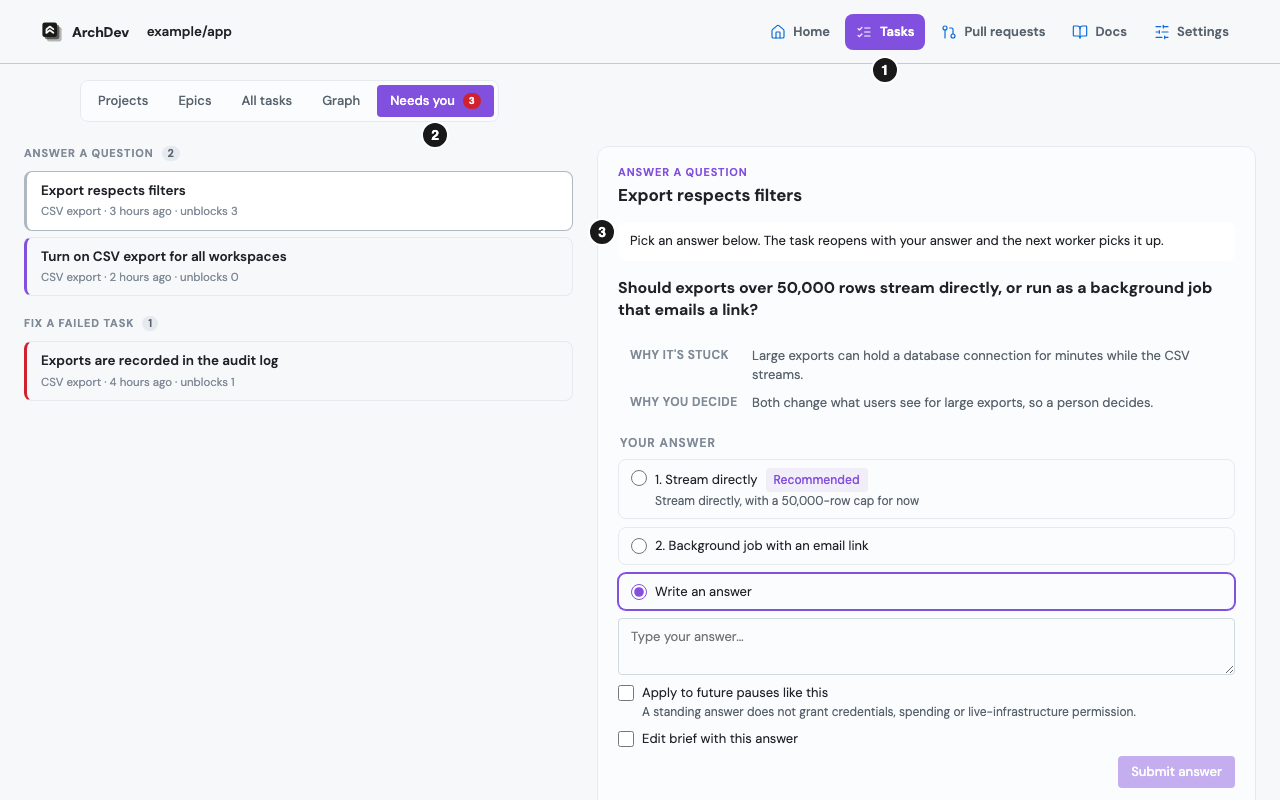
In the browser: this needs the Tasks and Projects experimental feature; turn it on. Open the notification bell at the top of any page. Needs you lists everything waiting on you; select an item to open it beside the list and answer it there, without leaving the page:
Or open one Task at archdev.ai/tasks/<task-id> and answer in its What this needs from you panel:
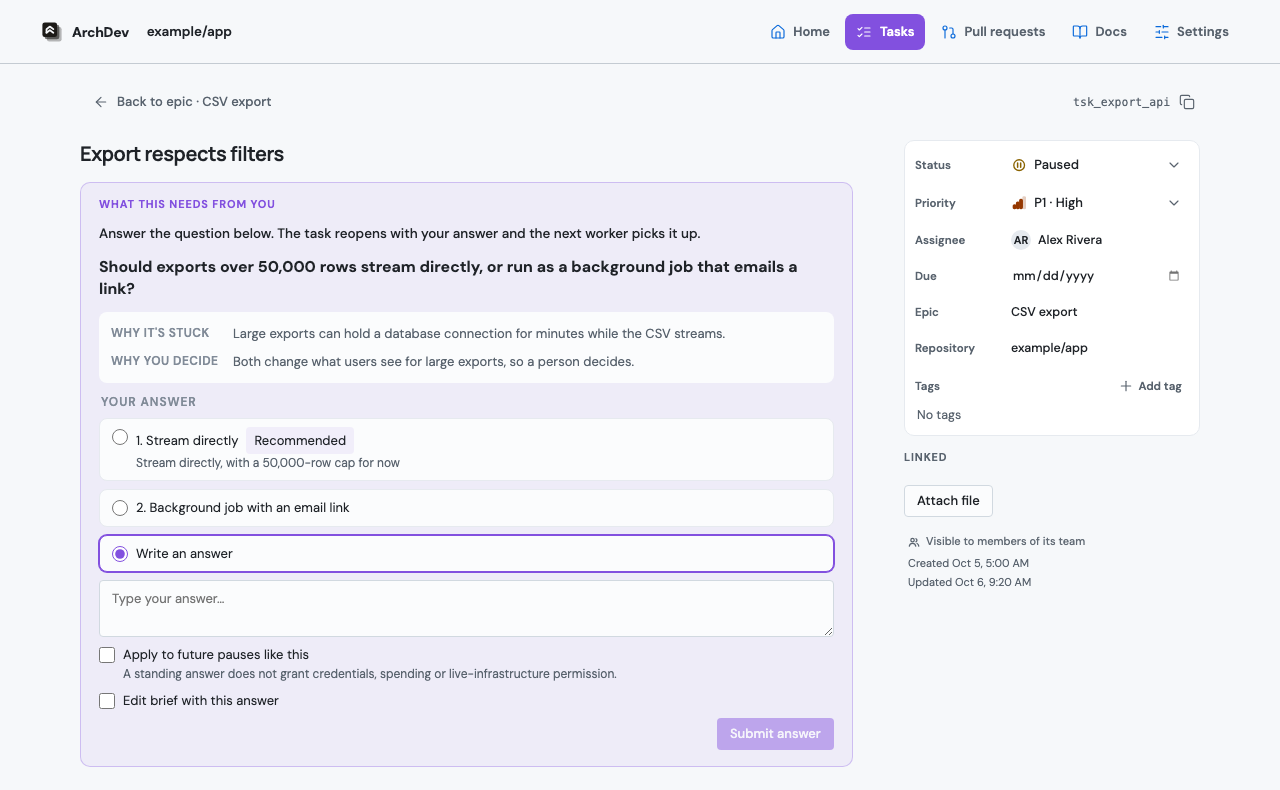
What happens next: your answer is added to the Task as a [human:answer] comment and the Task reopens. The next worker gets your answer as a requirement.
Stopped pull requests
When the daemon can't fix a pull request's CI failures or review feedback on its own, the PR appears in Needs you:
| Key | Action |
|---|---|
| r | Rearm: try remediation again |
| w | Rearm with a hint (posted as a PR comment) |
| p | Pause: add the no-autofix label |
| c | Close the PR (confirm with y) |
Choose how Tasks are dispatched
| Flag | Default | Effect |
|---|---|---|
--workers <n> |
3 (or factory.workers) |
Number of parallel workers, 1–32. |
--dispatch auto |
✓ | Workers claim every ready Task. |
--dispatch manual |
Workers claim a ready Task only after you release it, and each release covers one claim. In the Tasks tab, select the Task and press d, or ask the overseer: "dispatch export-api". | |
--autonomy confirm |
Route new worker questions to the operator. | |
--autonomy auto |
✓ (question routing) | Route new worker questions to the overseer, which decides and records why on the Task. When it needs human help, it pauses the Task with a question visible in the Work tab and answered on the task page. Explicitly selecting auto also retains administration authorization, including approval of plans with no major decisions; the default alone does not authorize task-review auto-approval. Credentials, spending, live infrastructure and merges still require human help. Switch during a session with /autonomy auto or /autonomy confirm; already-open questions are unchanged. |
--push-transport pipeline |
✓ | Commits go through the daemon's branch_update job, which verifies and publishes them. |
--push-transport direct |
Pushes straight to origin with no daemon verification. |
|
--model <id> |
factory.model |
The overseer model for this run. Use /model to change it while running. |
The same settings can go in archdev.json under factory (workers, dispatch, autonomy, push_transport). Command-line flags override them.
A typical first run, keeping control of which Tasks start:
archdev agents factory run --workers 2 --dispatch manual
Once you trust the plan and the checks:
archdev agents factory run --workers 6 --autonomy auto
Change settings while it runs
The Factory re-reads archdev.json, archdev.local.json and ~/.archdev/archdev.json when they change. You don't need to restart it for these:
| Setting | Takes effect |
|---|---|
factory.dispatch_gates |
The next time an idle worker looks for work (every 2 seconds) |
factory.worker_model |
The next Task a worker starts |
factory.worker_instructions |
The next Task a worker starts |
daemon.max_jobs (in ~/.archdev/archdev.json) |
The daemon's next job claim. Running jobs aren't stopped when you lower it. |
pr_watch, pull_requests |
The daemon's next pull request check |
Every other factory setting, and origin, modelAliases, publish.base and deploy_targets, keeps the value the Factory started with. The Factory log (~/.archdev/logs/archdev.log) records factory.config.reloaded with the keys it applied, and factory.config.restart_required with requires restart: <keys> for the rest. If the edited file is invalid, it records factory.config.reload_failed with the error and the overseer keeps its last valid settings. Fix the file quickly anyway: a worker reads archdev.json itself when it starts a Task, and can't start one while the file is invalid. The daemon logs daemon.config.reloaded and daemon.config.reload_failed in ~/.archdev/logs/daemon.log.
4. Stop and resume
Stop: press Ctrl-C twice within a second. Workers get 30 seconds to shut down cleanly. On exit it prints:
Session ID: <id>
Resume with: archdev agents resume <id>
From another terminal:
archdev agents factory status   # which process holds the lock
archdev agents factory stop     # graceful stop (add --force to kill after --timeout seconds)
Resume the same overseer conversation:
archdev agents resume <session-id>
Stopping the Factory doesn't stop the daemon. Pull requests that are already submitted keep getting verified, published and followed up.
Commands while it runs
| Command | Use it to |
|---|---|
archdev agents factory status |
See whether a Factory is running for this repository, and its PID |
archdev agents factory circuits |
See which model candidates each worker is skipping (usage limits, outages, bad credentials) and when they are retried |
archdev agents factory reset-circuits |
Retry all models now, for example after you log back in to a provider |
archdev settings provider usage |
Check how much of your ChatGPT or Grok plan each account has used |
archdev tasks inbox |
List the questions waiting for you |
archdev agents work list |
List worker assignments and their worktrees (works with the Factory stopped) |
archdev agents work resubmit <id> |
Submit an existing branch again without a worker (stop the Factory first) |
For errors, see Factory troubleshooting.