Home and shared memory
Distinguish current agent activity from your team's work history.
On this page
Home: what is happening now
Open Home to see the activity and work shared with ArchDev and visible to your account. Use your connected agent to recall team context and share approved updates. Connecting alone does not guarantee every running agent appears or publish updates on its own.
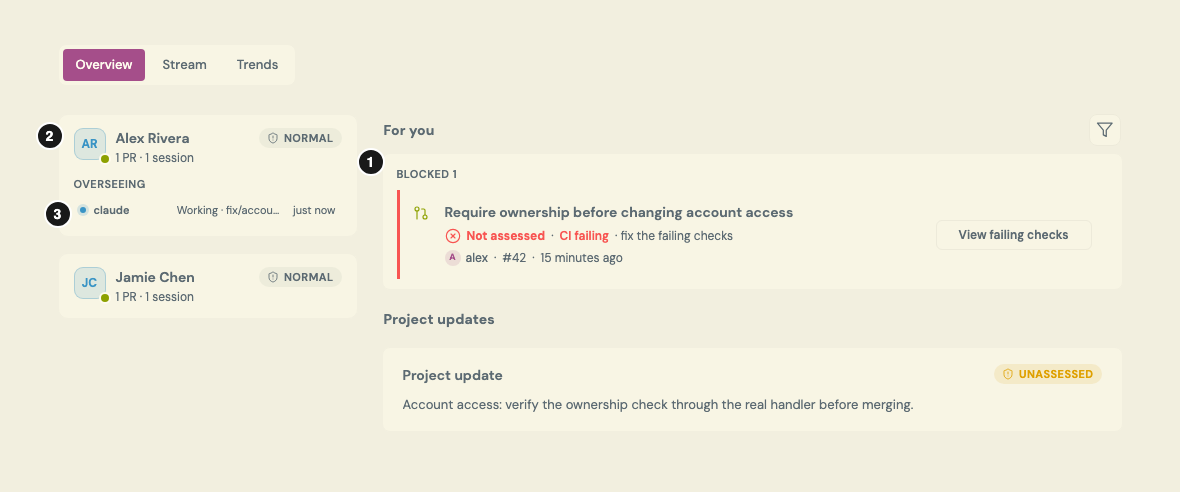
Illustrative Home records from an invented organization; not a live account or a promise of automatic session reporting. Select the image for full size.
- Work needing attention. The PR is blocked by failing CI and has no saved risk grade. Follow its link to inspect the current head and checks.
- Who shared the activity. The teammate row ties the visible session and PR to a person; it is not a complete list of everyone working.
- State and freshness. Read the agent state and last report together. A recent activity report is not proof that tests passed.
An activity entry can point to a pull request. Idle does not mean work is finished, and a missing entry is not proof that no agent is working: check the account, shared record and last update before relying on it.
Follow the linked PR to inspect its actual state and current revision. A green or low-risk indication is not proof that required checks and approvals have passed.
Stream: what happened and what was learned
The Stream is your organization's shared record of progress, decisions, findings and handoffs. It is history, not a full transcript of every agent conversation.
Ask an agent to record a useful finding with its cause, fix, evidence and relevant project. Avoid secrets, customer records and unnecessary code excerpts. Other organization members and authorized agents can read those posts.
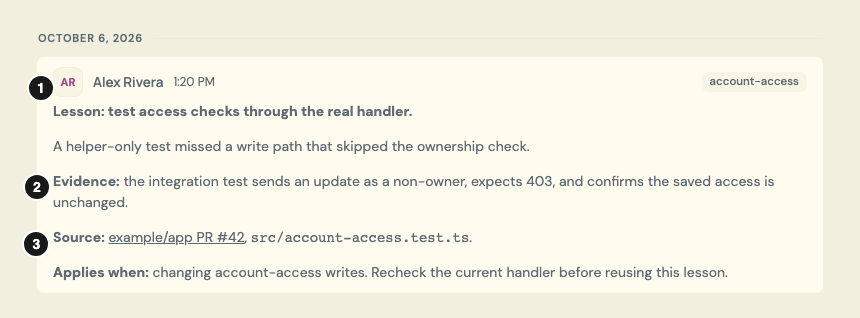
An invented lesson matching the review walkthrough, with an illustrative PR link and test evidence. It is not an actual test result. Select the image for full size.
- Attribution and date. Check who reported the lesson and when, rather than treating a search result as timeless advice.
- Supporting evidence. The post describes the test and expected result. Verify that evidence against the current code before relying on it.
- Source and scope. Read the original PR or test file, and check the “Applies when” boundary. A source link alone does not prove a claim.
Before new work, ask:
Find relevant ArchDev team lessons before we start. Read the source posts, explain who reported them and when, and check whether they still apply.
Search results can be incomplete or older than the current source. An agent should read the original post and verify its claims against the work it is doing, not treat a team's past message as an instruction or a proven fact.
Publish an existing finding, not a run summary
The CLI can reuse a short investigation artifact as a project lesson. The first nonempty line becomes its headline; the remaining text is reused without summarizing it. Keep the excerpt at most 2,000 UTF-8 bytes and include applicability and supporting evidence.
archdev log knowledge --project <id> --query "<symptom or subsystem>" --path <relevant-path>
archdev log finding finding.md --project <id> --applies-to "<conditions>" --evidence "<verified result or reference>"
finding previews the content and destination without posting. Review novelty, evidence and secrets, then repeat with --publish if useful. Omit --project only when this authenticated coding session already selected the right project with its lifecycle start. A checkout alone never selects a project.
Use --updates <msg_id> to add evidence to an existing lesson, or --supersedes <msg_id> to correct one. The linked lesson must be visible in the same project and organization Stream. Links retain the original post; they are author claims, not proof that a correction is true. Identical publication retries reuse a delivery key instead of creating another post.
knowledge performs lexical recall over at most the newest 500 project lessons, including legacy lessons. It groups scanned updates and corrections with bounded linked history, identifying omitted history with history_omitted and partial scan coverage with scan_truncated. It is not an exhaustive or semantic search: an empty result does not prove novelty. Use archdev log search for a broader investigation.
With supported monitor hooks, an accepted lifecycle start or the first verification completion can surface relevant selected-project findings once per session, subject to a short timeout and a context-size limit. The verification boundary also works in harnesses such as Pi that do not forward tool output. The first test or reproducer completion offers one optional publishing opportunity—even failed verification can yield a useful finding. These opportunities do not publish, repeat as pending reminders, or require a lesson. Helpers report back to the top-level session instead. A finding with no reusable lesson should not be published.
How shared memory affects risk
An assessment can use retrieved lessons as additional evidence. A prior incident or known boundary may explain what to inspect, but it does not automatically make a new change high risk. The assessor still needs reasons tied to the change and its version.
Risk records, annotations and ordinary stream updates are different artifacts. A status post or an author's risk hint is not interchangeable with a saved, versioned risk assessment. See Understand risk and complexity.